HTTP status codes: meaning of 1xx–5xx
From 200 OK to 503 Service Unavailable: what each status tells client and server.
|
100 Continue
|
1 | 100 | Continue | Informational | Client may continue sending the request body. |
|---|---|---|---|---|---|
|
101 Switching Protocols
|
2 | 101 | Switching Protocols | Informational | Server accepts the protocol switch. |
|
102 Processing
|
3 | 102 | Processing | Informational | Request accepted and still processing. |
|
200 OK
|
4 | 200 | OK | Success | Request succeeded. |
|
201 Created
|
5 | 201 | Created | Success | A new resource was created. |
|
202 Accepted
|
6 | 202 | Accepted | Success | Accepted for asynchronous processing. |
|
204 No Content
|
7 | 204 | No Content | Success | Success with an empty body. |
|
206 Partial Content
|
8 | 206 | Partial Content | Success | Partial content delivery. |
|
301 Moved Permanently
|
9 | 301 | Moved Permanently | Redirection | Resource permanently moved. |
|
302 Found
|
10 | 302 | Found | Redirection | Temporary redirect. |
|
304 Not Modified
|
11 | 304 | Not Modified | Redirection | Cached content is still valid. |
|
307 Temporary Redirect
|
12 | 307 | Temporary Redirect | Redirection | Temporary redirect keeping the method. |
|
308 Permanent Redirect
|
13 | 308 | Permanent Redirect | Redirection | Permanent redirect keeping the method. |
|
400 Bad Request
|
14 | 400 | Bad Request | Client error | Malformed or incomplete request. |
|
401 Unauthorized
|
15 | 401 | Unauthorized | Client error | Authentication required or failed. |
|
403 Forbidden
|
16 | 403 | Forbidden | Client error | Authenticated but not allowed. |
|
404 Not Found
|
17 | 404 | Not Found | Client error | Resource was not found. |
|
405 Method Not Allowed
|
18 | 405 | Method Not Allowed | Client error | HTTP method not accepted. |
|
408 Request Timeout
|
19 | 408 | Request Timeout | Client error | Server timed out waiting. |
|
409 Conflict
|
20 | 409 | Conflict | Client error | Conflicts with current resource state. |
|
410 Gone
|
21 | 410 | Gone | Client error | Resource permanently removed. |
|
415 Unsupported Media Type
|
22 | 415 | Unsupported Media Type | Client error | Unsupported payload format. |
|
422 Unprocessable Entity
|
23 | 422 | Unprocessable Entity | Client error | Syntax ok, semantics fail. |
|
429 Too Many Requests
|
24 | 429 | Too Many Requests | Client error | Rate limit exceeded. |
|
500 Internal Server Error
|
25 | 500 | Internal Server Error | Server error | Generic server failure. |
|
501 Not Implemented
|
26 | 501 | Not Implemented | Server error | Feature not implemented. |
|
502 Bad Gateway
|
27 | 502 | Bad Gateway | Server error | Invalid upstream response. |
|
503 Service Unavailable
|
28 | 503 | Service Unavailable | Server error | Service temporarily unavailable. |
|
504 Gateway Timeout
|
29 | 504 | Gateway Timeout | Server error | Upstream timed out. |
|
511 Network Authentication Required
|
30 | 511 | Network Authentication Required | Server error | Network login required. |
No item matched. Clear a filter or shorten the search.
About
What an HTTP status code actually tells you
A status code is the short first answer a server sends after receiving a request. It does not tell the whole story, but it quickly separates success, redirection, a problem with the request, and a failure while the service was handling it. The table collects codes that recur in browsers, APIs, logs, and development tools.
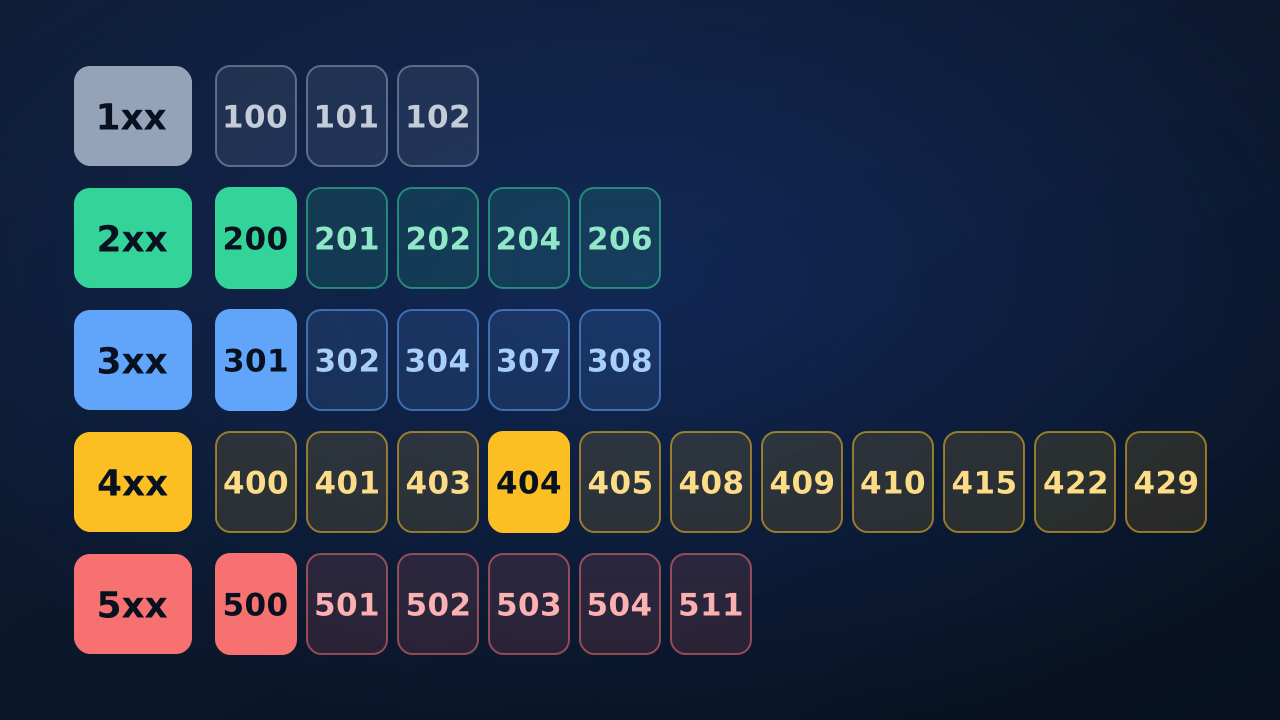
Read the first digit as a class before looking for a specific case: 1xx is informational, 2xx signals success, 3xx deals with redirection, 4xx points to a request the client can usually review, and 5xx means the server or an intermediary failed while serving an apparently valid request.
The status does not replace the rest of the response
A code is an initial diagnosis, not a full explanation. For an API request, check the method, URL, headers, error body, and time of the attempt. A 400 can result from a required field that is absent, a 401 can follow an expired credential, and a 429 can require waiting for the interval stated by that service.
Do not assume that every successful response contains JSON or HTML. RFC 9110 specifies that 1xx, 204, and 304 responses do not include content. A client that receives 204 No Content can therefore have completed its action successfully even though there is no body to display.
200, 201, 202, and 204 are successful in different ways
A 200 confirms that a request succeeded, but it does not by itself tell you what action occurred. A 201 is appropriate when a resource has been created. A 202 says the server accepted work without promising that processing has finished. A 204 means the request succeeded and there is no additional response content.
Those distinctions prevent misleading interfaces. A form that receives 202 should explain that work is pending; a deletion that returns 204 should not try to parse a body that cannot be there. The right behaviour comes from the API contract, not from choosing the most familiar success code.
Redirections: 301, 302, 307, and 308
A 3xx response asks the client to consider another address. 301 and 308 are used for permanent moves; 302 and 307 for temporary ones. The important practical difference is that 307 and 308 explicitly preserve the request method. That matters when the original request was not a simple GET.
Read 304 separately from the other redirects. It does not mean that a page failed or that the server refused the request. In response to a conditional request, it means the representation held in cache is still valid, so a new body is not sent.
How to investigate a 4xx response without guessing
Most 4xx responses point to something the client can inspect. Start with path, method, and parameters. Then check authentication, permission, request-body format, and documented usage limits. That sequence is more useful than repeatedly changing credentials when the real problem is a wrong route or a POST sent to an endpoint that accepts only GET.
- 401 calls for valid authentication; 403 means the server understood the request but refuses access.
- 404 says that the resource was not found; 410 says it existed and has been removed.
- 405 identifies a method the target resource does not allow; 415 identifies unsupported media type.
- 422 Unprocessable Content can occur when syntax is understood but the supplied content does not meet the conditions needed for processing.
- 429 means a request limit was exceeded. Follow the service policy and any relevant headers before making another call.
When a 5xx response points to a server, gateway, or dependency
A 500 is a general failure while processing. A 502 suggests that a gateway or proxy received an invalid response from another component. A 503 commonly signals temporary unavailability, while a 504 says a gateway did not receive a response in time. All belong to the server-error class, but they lead to different checks.
Before retrying the same request many times, record the time, code, and any request identifier returned. That gives the service owner something concrete to investigate and helps distinguish an upstream outage from a validation failure in the client application.
Using the table in development and support
Search by number when a code appears in a log, then filter by class to see a pattern. If several endpoints return 502 or 504 during the same period, investigation usually moves toward a proxy or origin service. If only one route returns 404, begin with the published URL, environment, and path.
For live examples from public services, browse the DexBase API catalogue. Use each provider’s documentation to learn which responses are part of its own contract.
Reference and scope of this list
HTTP codes evolve through specifications and registry. RFC 9110 is the normative reference for general semantics, while the IANA registry records the codes and their assignments. This list highlights frequent cases; it does not replace the documentation of a particular API, browser, server, or framework.
Frequently asked questions
Is 204 an error?
No. A 204 means the request was handled successfully and there is no additional content to send in the response body.
What is the difference between 404 and 410?
A 404 says the resource was not found at that time. A 410 says it existed and has been permanently removed.
Are 502 and 504 the same?
No. A 502 reports an invalid response from an upstream component, while a 504 reports that a gateway waited and did not receive a response in time.