Common network ports: TCP, UDP and services
HTTP 80, HTTPS 443, SSH 22, DNS 53 and other ports you meet every day.
|
20 · FTP data
|
1 | 20 | TCP | FTP data | File transfer data channel |
|---|---|---|---|---|---|
|
21 · FTP control
|
2 | 21 | TCP | FTP control | FTP session control |
|
22 · SSH
|
3 | 22 | TCP | SSH | Secure remote access |
|
23 · Telnet
|
4 | 23 | TCP | Telnet | Legacy remote access |
|
25 · SMTP
|
5 | 25 | TCP | SMTP | Server-to-server email |
|
53 · DNS
|
6 | 53 | TCP/UDP | DNS | Name resolution |
|
67 · DHCP server
|
7 | 67 | UDP | DHCP server | IP assignment |
|
68 · DHCP client
|
8 | 68 | UDP | DHCP client | IP client configuration |
|
80 · HTTP
|
9 | 80 | TCP | HTTP | Unencrypted web |
|
110 · POP3
|
10 | 110 | TCP | POP3 | Email retrieval |
|
123 · NTP
|
11 | 123 | UDP | NTP | Clock sync |
|
143 · IMAP
|
12 | 143 | TCP | IMAP | Mailbox access |
|
161 · SNMP
|
13 | 161 | UDP | SNMP | Network monitoring |
|
443 · HTTPS
|
14 | 443 | TCP | HTTPS | TLS web |
|
465 · SMTPS
|
15 | 465 | TCP | SMTPS | Implicit TLS mail submit |
|
587 · SMTP submission
|
16 | 587 | TCP | SMTP submission | Authenticated mail submit |
|
993 · IMAPS
|
17 | 993 | TCP | IMAPS | IMAP over TLS |
|
995 · POP3S
|
18 | 995 | TCP | POP3S | POP3 over TLS |
|
1433 · Microsoft SQL Server
|
19 | 1433 | TCP | Microsoft SQL Server | SQL Server database |
|
1521 · Oracle
|
20 | 1521 | TCP | Oracle | Oracle database |
|
3306 · MySQL/MariaDB
|
21 | 3306 | TCP | MySQL/MariaDB | MySQL database |
|
3389 · RDP
|
22 | 3389 | TCP | RDP | Windows remote desktop |
|
5432 · PostgreSQL
|
23 | 5432 | TCP | PostgreSQL | PostgreSQL database |
|
5900 · VNC
|
24 | 5900 | TCP | VNC | Remote GUI control |
|
6379 · Redis
|
25 | 6379 | TCP | Redis | In-memory store |
|
8080 · HTTP alternate
|
26 | 8080 | TCP | HTTP alternate | Dev proxies and apps |
|
8443 · HTTPS alternate
|
27 | 8443 | TCP | HTTPS alternate | Alternate HTTPS port |
|
27017 · MongoDB
|
28 | 27017 | TCP | MongoDB | MongoDB database |
No item matched. Clear a filter or shorten the search.
About
What this table helps you work out
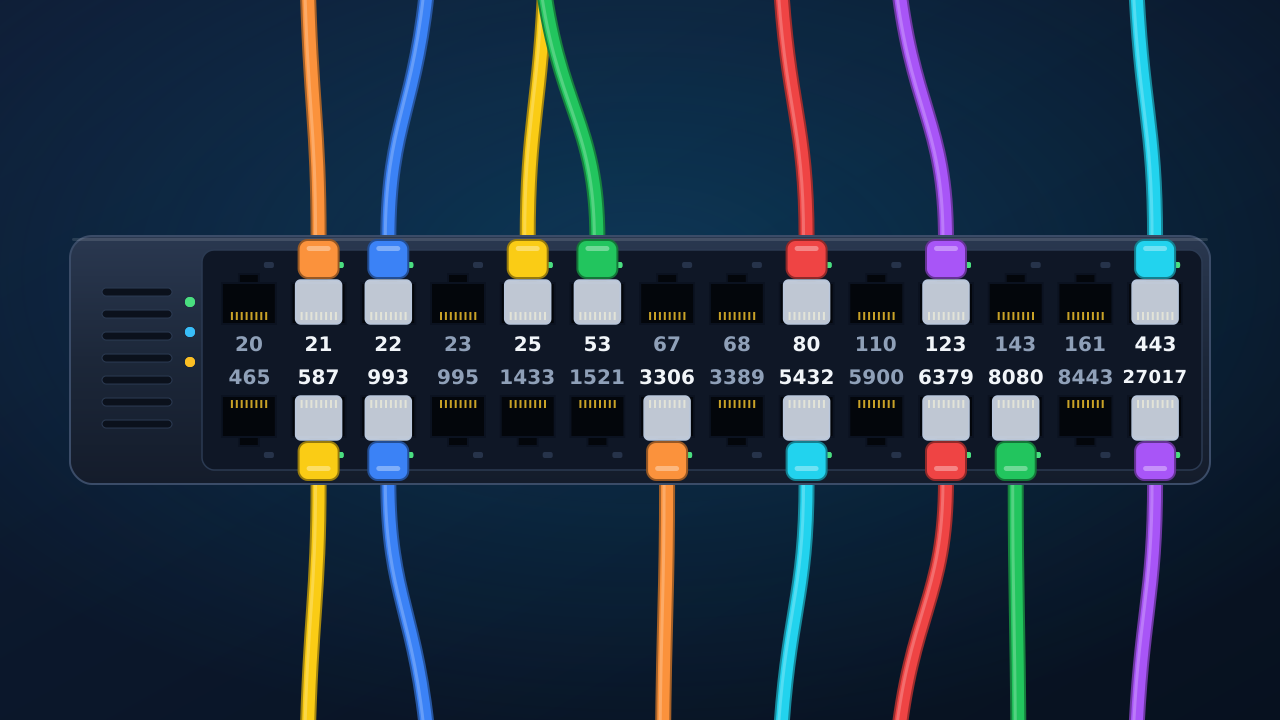
A port is the logical point that lets a system deliver a connection or datagram to the right service within an IP address. When someone mentions 443, they usually mean HTTPS; 22 commonly points to SSH; 53 appears in DNS queries. The table gathers these recurring conventions for reading logs, configuring an environment, or reviewing a network rule.
The number is only one part of the picture. To interpret an access, also check the transport protocol, destination address, and service configured on that host. An open port alone does not identify the process using it or prove that the service is reachable from the public internet.
TCP and UDP can use the same number
TCP and UDP have separate port spaces, so the same number can appear in both without conflict. DNS is the familiar example: port 53 commonly uses UDP for ordinary queries, but TCP is also used when the exchange needs a different form of data transfer.
Filter by protocol before making a decision. A rule for 53/UDP is not automatically a rule for 53/TCP. In the same way, an application listening on 8080/TCP has no necessary relationship to an application using 8080 with UDP.
The three port ranges
The IANA Service Name and Transport Protocol Port Number Registry groups port numbers into three ranges. The groups help put a configuration in context:
- 0 to 1023: system ports, historically associated with services such as HTTP, HTTPS, SSH, SMTP, and DNS.
- 1024 to 49151: user or registered ports, where many application protocols and products are found.
- 49152 to 65535: dynamic or private ports, which IANA does not assign to a specific service.
The ranges are not an allow-list. They describe how numbering is organised. A service can be configured on another port, so a default port is a useful starting point for investigation rather than proof of the installation you have found.
How to look up a port without confusing service and configuration
Start with the number when it appears in an error, URL, or firewall rule. Then check the protocol column and the service that conventionally uses that combination. If your question begins with a product, search by name: MySQL or MariaDB, PostgreSQL, Redis, and MongoDB have their own rows so that databases do not become a collection of unexplained numbers.
During local development, a startup failure can simply mean that another process is already listening on the same address, protocol, and port. Before changing a number at random, identify the process in use and decide which application should own that port. That preserves links, documentation, and integrations that expect a known address.
A default port is not the identity of a service
It is useful to associate 80 with HTTP and 443 with HTTPS, but administrators can change a service port. A proxy, redirection, or several applications behind one address can also change what a connection reaches. The table records practical conventions; confirmation comes from configuration, system documentation, and the observed connection.
This distinction matters in reports and inventories. Recording 3306/TCP as a common MySQL port helps recognise a pattern, but it does not prove that every host with 3306 open runs the same version, database, or externally accessible instance.
What to review before exposing a port
Remote administration services and databases need context before they are opened to a network. SSH, RDP, VNC, MySQL, PostgreSQL, Redis, and MongoDB have legitimate uses, but they do not need to be reachable beyond the people and systems that actually depend on them. Limit access to what is necessary, keep authentication appropriate, and review the service that is listening.
For a public website, 80 and 443 may be part of normal delivery. For a database, the same decision is rarely automatic. Treat this list as a way to ask the right question: who needs to reach this port, from where, and for which task?
Situations where the table saves time
- Reading an address such as https://example.com:8443 and recognising HTTPS on an alternative port.
- Separating DNS, HTTP, and remote-access problems while reviewing logs or error messages.
- Checking a local database’s usual port before connecting a development tool.
- Documenting an environment without relying on the memory of the person who first configured it.
Frequently asked questions
What is the HTTPS port?
The default HTTPS port is 443/TCP. A site can use another port, such as 8443, when its server configuration calls for an alternative.
Does DNS use TCP or UDP?
Both. Port 53 exists for TCP and UDP; the correct transport depends on the exchange between client, resolver, and name server.
Can I use a high port for development?
Yes. Dynamic or private ports are not assigned by IANA to a particular service, but you still need to avoid collisions with running processes and document the chosen value in the project.